An employee account signs in from an unfamiliar location and begins accessing corporate resources. The security team gets the alert, though confirming what happened means establishing whether the identity is compromised and which device was involved. Whether the activity also touched sensitive company information determines how serious the incident becomes.
Connecting Microsoft Defender, Microsoft Sentinel and Microsoft Purview lets that investigation move past “what triggered the alert” to “what happened, what was affected and what should happen next.” Each platform covers different ground: Defender generates the threat signals, Sentinel correlates activity across the environment and Purview establishes what the data involved actually means. The value comes from deliberately connecting those capabilities, not from forcing the three into a single product.
The hard part is deciding what an analyst actually needs and where that analysis should happen. Sending every available event to Sentinel produces more data without producing more evidence. The same problem applies to data sensitivity, since analysts who cannot tell what’s sensitive cannot weigh it into the response.
This article covers each platform’s role and how they work together during an investigation. It closes with the architectural decisions that make the integration hold up in practice.
What Role Does Microsoft Defender Play?
Microsoft Defender provides the protection and threat detection capabilities that generate security signals. Endpoint signals offer evidence about process activity and file behavior on a device, while identity signals show suspicious authentication activity. Email, collaboration and cloud application signals add further evidence about activity involving users and applications.
These signals matter most when an incident spans more than one security domain. Viewed separately, a suspicious sign-in followed by unusual behavior on a device or activity on another resource can look like unrelated events. Microsoft Defender XDR (extended detection and response) correlates signals from supported Microsoft security services and groups related alerts into a single incident so analysts can investigate the activity as one event rather than several.
Security teams still need information from outside the Defender ecosystem. Organizations running on-premises systems and third-party apps may go beyond Defender XDR’s capability to see security-related events from those sources because it focuses on Microsoft’s own security ecosystem. Microsoft Sentinel brings those Microsoft and non-Microsoft sources into the same investigation.
- Related Resource: Microsoft Defender for Cloud & Defender for Cloud Apps: Differences and When to Use Both
What Role Does Microsoft Sentinel Play?
Microsoft Sentinel provides the security operations layer that consolidates events across an environment. It functions as a security information and event management (SIEM) and security orchestration, automation and response (SOAR) platform that consolidates events across Microsoft and non-Microsoft sources, including cloud platforms and on-premises systems.
A single unusual sign-in rarely justifies escalation, though a denied firewall connection and unfamiliar activity in a third-party application at the same time raise the stakes. Sentinel correlates those signals across sources to determine whether they belong to the same incident and then supports the investigation with incident management and automated response when predefined conditions are met. Analysts investigate the connected activity as a single incident rather than three disconnected alerts.
Sentinel’s reach extends past Defender’s Microsoft-only signals to systems Defender never touches, including third-party applications and on-premises infrastructure. That reach is what lets Microsoft and non-Microsoft signals meet inside a single investigation instead of living in separate tools. What Sentinel cannot tell an analyst is what the data touched during that activity actually means.
What Role Does Microsoft Purview Play?
Microsoft Purview provides the data governance capabilities that help organizations identify sensitive information and control how it’s handled. It works from a different vantage point than Defender or Sentinel: instead of detecting threat activity, it establishes what the information involved in that activity actually is.
A security event can show that a user accessed a file without revealing why that file matters. Purview supplies that context through data discovery and classification, then applies sensitivity labels that flag protected material such as customer records or financial information. That context lets security teams weigh impact accordingly, since a lost financial record carries far more weight than a suspicious login with no data exposure.
That weighting only holds up if Purview can act on the risk it identifies, not just classify it. Data loss prevention (DLP) policies detect and restrict actions that could expose protected information, while insider risk capabilities surface risky patterns in how users handle organizational data.
How to Design the Integration
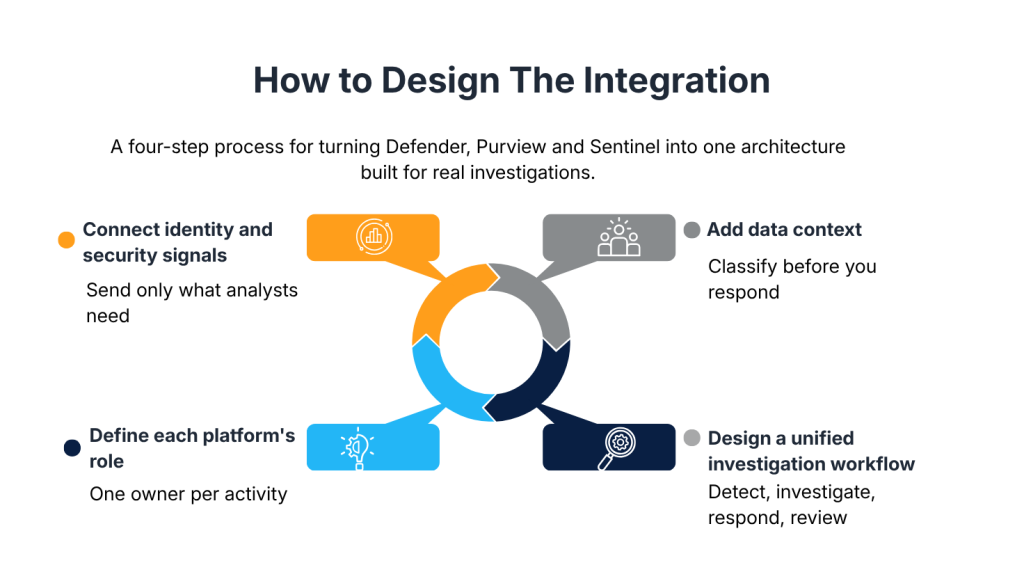
Connecting Defender, Sentinel and Purview is only part of the work. The architecture still needs a decision about what information moves between platforms and a separate decision about which platform owns each type of security activity. Skipping either leaves an organization collecting information analysts do not need or duplicating responsibilities across platforms.
1) Connect Identity and Security Signals
Start with the investigations the security team actually needs to perform, not with every source that happens to be available. Authentication events and application activity earn their place when the team needs to determine whether a compromised account reached a particular application, while network events earn theirs when tracing activity through a network device matters. A source that cannot answer an investigation question does not belong in Sentinel simply because it is available.
The same discipline applies to volume, not just source selection. A cloud identity provider can generate thousands of routine authentication events, though only a small subset actually shows activity worth an analyst’s attention, such as denied access attempts or sign-ins from unfamiliar locations. Sending the full event stream to Sentinel inflates ingestion costs and gives analysts more records to sift through without producing more useful evidence.
- Related Resource: Phishing-Resistant MFA: Methods, Risks and Rollout
2) Add Data Context
Security events can show that an account touched a file without showing what that file actually contains. Purview resolves that blind spot through data discovery and classification, then applies sensitivity labels that flag protected material such as customer records or financial information. Ignoring that sensitivity treats a breach of regulated data the same as a breach of routine internal files, though the two rarely carry the same consequences.
These controls become relevant once an investigation needs to establish how sensitive information was handled, not before. Building blanket DLP policies or insider risk alerts around every classification tier increases noise without necessarily catching more risk. Data controls earn their place where classification actually changes the response, not simply where classification exists.
3) Define Each Platform’s Role
The architecture should make clear which platform owns each security activity. Defender can detect and handle an endpoint or identity threat without involving Sentinel, while Sentinel becomes relevant only when the investigation needs events from outside the Defender ecosystem. Purview becomes relevant once the incident touches information whose classification changes how it gets assessed.
- Related Resource: Microsoft Defender and Purview: A Practical Security Operating Model
Though some capabilities overlap, that does not mean every platform should perform the same task. A security event that triggers both a Defender alert and a matching Sentinel detection rule needs one platform assigned as the owner before duplicate work reaches an analyst’s queue. The same principle applies to response controls, since separate alerts or policies addressing the same risk across multiple platforms leave analysts unsure which response should actually take effect.
4) Design for a Unified Investigation Workflow
The investigation should have a clear path from initial detection to the information needed to investigate and respond. An analyst typically starts with a Defender incident and moves to Sentinel once activity from other systems needs to sit alongside those signals. Purview enters the picture when the investigation involves information whose sensitivity affects the potential impact.
Automation works best where the required action is predictable, such as isolating a device once specific conditions are met, while decisions that require judgment stay with an analyst. Microsoft is also merging Defender and Sentinel capabilities into a single portal, keeping detection and response in one working environment instead of separate tools. As the environment changes with new systems or data sources, the alerts and workflows built around this architecture need reassessment rather than being treated as a one-time setup.
Conclusion
Defender, Sentinel and Purview carry different responsibilities inside the security architecture. None of them needs to absorb the others for that architecture to work. What matters is that each platform’s information reaches the part of the investigation that actually needs it, not that the three operate as one system.
An investigation built this way still starts with what happened. Sentinel then connects that activity across systems, while Purview weighs in only where the data itself changes what that activity means. That combination gives the team a clearer basis for deciding what happens next, since activity and impact carry more weight than the alert alone.
At CrucialLogics, we build Defender, Sentinel and Purview architecture around how your team actually investigates, not what Microsoft ships by default. If you’re considering building a unified stack, explore our Managed Security Services or schedule a call with our team to start mapping your own Defender, Sentinel and Purview integration.