Microsoft Intune Consulting Services

Secure, monitor and mitigate endpoint devices across your enterprise

Managing devices across a remote or hybrid workforce shouldn’t put your security and compliance at risk. 

Our Microsoft Intune consulting services give you consistent endpoint policies, full device visibility, and a governance structure that scales with your organization, whether you’re managing corporate devices, BYOD, or both.

Get Started Today

Logo featuring the blue Windows-style four-pane icon to the left of the text Microsoft Intune in blue font; clean, minimalist design on a white background representing Microsoft’s cloud-based device management service.

Intune Consulting Services

Microsoft Intune can help organizations stay secure and compliant by:

device ENCRYPTION

Organizations can use Microsoft Intune to encrypt their devices with BitLocker, which helps protect company data and keeps it safe from unauthorized access. This layer of encryption also helps to comply with industry regulations that require encryption of sensitive data.

antivirus software updates

With Microsoft Intune, companies can deploy security patches, bug fixes, and other antivirus software updates quickly and efficiently to all of their systems. This ensures that their systems are always up-to-date and secure against the latest malware threats.

conditional access policies

Microsoft Intune makes it easy for organizations to enforce conditional access policies that restrict access to sensitive corporate data based on compliance settings such as device ownership, type, risks etc. This allows organizations to have better control over who has access to their most important information.

Group policy management

Microsoft Intune simplifies the process of deploying applications and pushing out settings changes across Windows and Mac computers both quickly and easily, so organizations don’t have to spend much time managing multiple machines manually. Additionally, they can use this feature to ensure that all devices remain in compliance with company standards at all times through automated management tools such as remote lock screen configuration or automatic application installation/updates via app stores like the Apple App Store or Google Play Store.

Deployment Across Operating Systems

Organizations can use Microsoft Intune's Autopilot technology for deployment across different operating systems (OS) including Windows or macOS Sierra. It also supports white glove enrolment, which enables IT professionals to setup users in remote locations.

Already have Intune?

Testimonials

How We Work

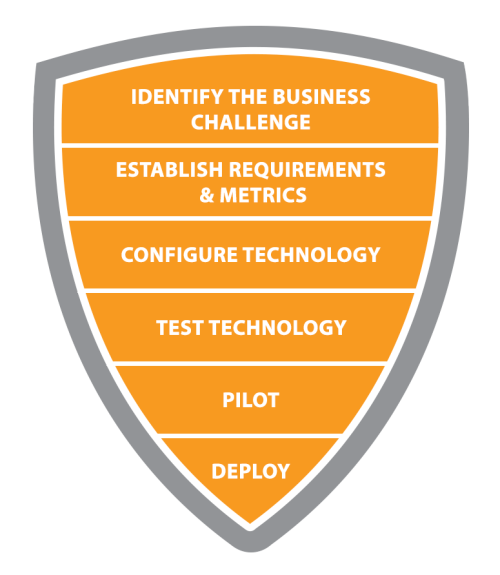
We remove the barriers that make cybersecurity complex. We deeply understand attacker behaviour and how to secure against them.

An orange and gray shield-shaped diagram outlining a five-step business process; the sections list in order from top to bottom—Identify the Business Challenge, Establish Requirements & Metrics, Configure Technology, Test Technology, and Pilot.

Learn more in our resource library

Secure Your Endpoints today

Amol Joshi, CEO, CrucialLogics Headshot

Amol Joshi

CHIEF EXECUTIVE OFFICER

Amol is a senior security executive with over 20 years of experience leading and delivering complex IT transformation and cybersecurity programs. He believes strong security is achieved through standardization, reduced complexity, and the strategic use of native, easy to manage technologies.

Known for his detail oriented approach, Amol consistently drives measurable results across highly technical and mission critical initiatives. Creative, innovative, and forward thinking, he applies the Consulting with a Conscience™ philosophy to guide organizations toward secure, practical, and sustainable IT solutions.