Microsoft Purview Information Protection secures data across Microsoft 365 by classifying, labeling, and protecting sensitive content in files, emails, and collaborative environments.
Information Protection is not just a labeling feature. It is a governance framework that helps organizations control how sensitive data is identified, protected, shared, and monitored. The label itself is not the end product. It is the input that downstream controls act on, from Data Loss Prevention (DLP) and Insider Risk Management to compliance policies and collaboration controls.
This is the fundamental shift in Microsoft’s approach to information protection. Protection follows the data itself rather than relying on where it is stored.
This guide explains the core concepts of Microsoft Purview Information Protection, how sensitivity labels interact with enforcement tools such as DLP, and what organizations should consider when operationalizing labeling at scale.
What Microsoft Purview Information Protection Does
Microsoft Purview Information Protection performs two core functions: it classifies sensitive information and applies persistent protection to that content across Microsoft 365.
Sensitivity labels are metadata-driven classifications attached to files, emails, and collaborative content. A document may be classified as Public, Internal, Confidential, or Highly Confidential depending on the organization’s governance model and business risk requirements.
Once content is labeled, Microsoft 365 services use that classification as context for downstream policy decisions. A DLP policy may block external sharing of a file labeled “Confidential.” Insider Risk Management may prioritize investigations involving highly sensitive content. Encryption policies may restrict forwarding or external access to sensitive documents.
The label creates the context. Enforcement tools act on it. Without classification, those tools operate with limited information, making enforcement less precise and harder to manage at scale.
Core Concepts Behind Information Protection
Microsoft Purview Information Protection is built on several connected components that work together to classify, protect, and govern sensitive data.
1) Sensitive Information Types
Sensitive information types are the detection layer. They identify regulated and sensitive data such as financial records, health information, tax identifiers, and credentials by detecting patterns, keywords, and supporting evidence within files, emails, and other Microsoft 365 content.
Detection accuracy matters because everything downstream depends on it. If Microsoft 365 cannot reliably identify the sensitive data patterns your organization handles, then labeling, DLP enforcement, and compliance policies all become inconsistent.
This is especially critical in regulated environments that process large volumes of PII daily, such as healthcare, insurance, pharma, and financial services. Detection models need to reflect the organization’s actual data patterns. Otherwise, policies either miss sensitive content or generate excessive false positives that users learn to ignore.
2) Sensitivity Labels and Label Policies
Sensitivity labels define how content should be classified and protected. Organizations commonly structure labels around categories such as Public, Internal, Confidential, and Highly Confidential.
Label policies serve a different purpose. They determine which labels are available to specific users and groups, and where those labels appear across Microsoft 365. Labels define the classification model, whereas policies govern how that model is exposed and applied.
If the label structure is too broad, enforcement lacks precision. If it is too granular, users struggle to apply labels consistently. A practical model balances governance requirements with usability so that users can classify content confidently without slowing down collaboration.
3) Encryption and Access Controls
Sensitivity labels can also apply encryption and access restrictions to files and emails, including restricting forwarding, limiting external access, preventing copying or printing, or controlling who can open protected content.
Encryption should be introduced carefully because it directly affects collaboration workflows. Broad enforcement too early in a deployment creates operational friction, unnecessary access issues, and increased support overhead.
A more practical approach starts with classification and visibility, then expands to stricter controls where business risk justifies them. The instinct to lock everything down from day one is understandable, but it consistently creates more problems than it solves.
4) How Labels Interact with DLP
Sensitivity labels and DLP policies are closely connected but serve different functions.
Labels classify and protect content while DLP policies evaluate user activity, sharing behavior, locations, and actions to determine whether activity should be allowed, blocked, audited, or escalated.
When labels and DLP are designed together, organizations gain cleaner enforcement, stronger governance, and fewer false positives. When they are designed in isolation, the result is policies that conflict, overlap, or leave gaps that neither team realizes exist.
The challenge is that DLP cannot simply be enabled with default settings and expected to work. Microsoft provides templates and baseline policies, but those defaults do not account for how sensitive data actually moves across your organization.
Policies need to reflect real collaboration patterns, approved workflows, and legitimate business exceptions across Teams, SharePoint, OneDrive, email, and external sharing scenarios. Without that tuning, DLP either disrupts legitimate work or fails to catch meaningful risk.
How Microsoft Purview Information Protection Works
Microsoft Purview Information Protection can apply labels manually, through user recommendations, or automatically based on policy conditions. The right approach depends on the organization’s deployment maturity.
Manual vs. Automatic Labeling
Manual labeling gives users direct control over how content is classified. During early deployments, this helps organizations understand how users interpret labels in real workflows and exposes gaps in the label structure before broader enforcement is introduced.
Recommended labeling sits between manual and automatic. Microsoft Purview detects sensitive content and suggests an appropriate label while still allowing the user to make the final decision. This builds confidence without removing user agency.
Automatic labeling applies labels without user action when predefined conditions are met. It is powerful, but it should be validated for detection accuracy, include exception handling, and assess workflow impact. Deploying it too early leads to misclassification and unnecessary operational friction that erodes trust in the system.
Label Enforcement Across Files and Emails
Once applied, labels persist with content across supported Microsoft 365 services and file locations.
Depending on configuration, labels can apply encryption, access restrictions, content markings, and sharing controls across files and emails. This becomes important in environments where data moves constantly between applications. A document shared from OneDrive to Teams, forwarded via email, or synced to SharePoint, needs consistent protection across all those workflows.
Defining where labeled content should be allowed, where it should be exempted, and where it should be blocked across these cross-application workflows is one of the most important and most frequently skipped steps in any deployment.
Monitoring Labeled Content and Activity
Microsoft Purview provides monitoring and reporting tools that help organizations understand how sensitive data is classified, shared, and used.
Content Explorer identifies where sensitive and labeled content exists. Activity Explorer provides visibility into how labels and sensitive information are being used across the environment. When violations or unusual behavior occur, audit logs support investigations.
These monitoring tools are the feedback loop. They tell you whether the label structure, policies, and enforcement are producing the outcomes you intended or generating noise that nobody is acting on. Without this feedback, there is no basis for tuning, and without tuning, deployment degrades over time.
Information Protection Within the Microsoft Security Stack
Microsoft Purview Information Protection delivers the greatest value when it operates within a broader Microsoft 365 security and governance model rather than as a standalone solution.
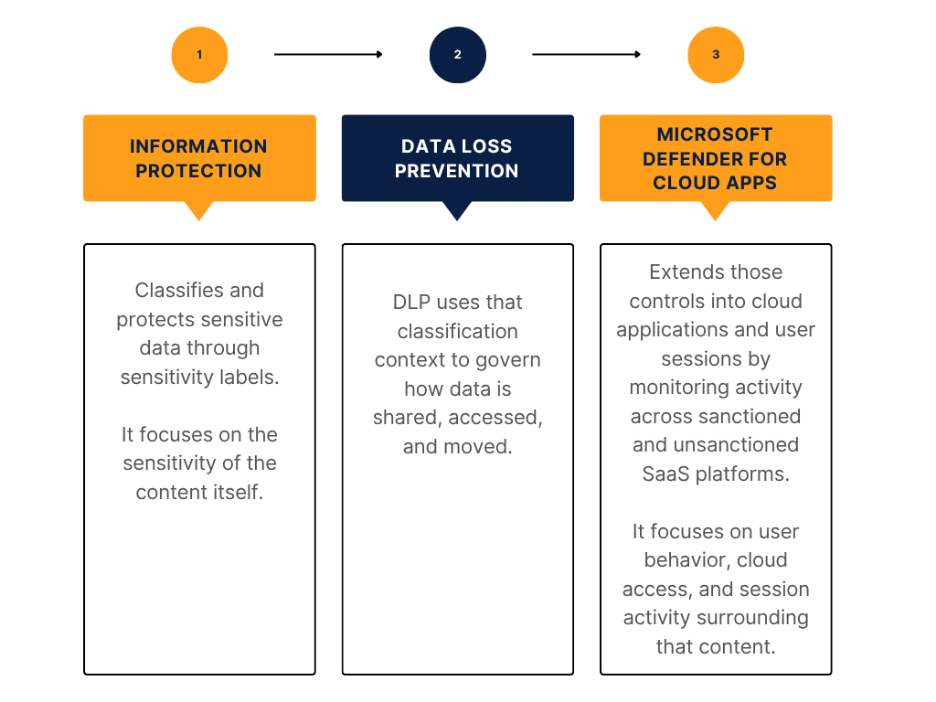
Together, these three components create a coordinated control model. Information Protection identifies and classifies sensitive data. DLP governs risky movement and sharing. Defender for Cloud Apps monitors how users interact with that data across cloud environments.
The operational value comes from integrating these signals into a single governance process. Labels, DLP alerts, cloud activity, and user behavior should collectively inform how the organization evaluates risk, investigates incidents, and refines enforcement.
Deploying Information Protection Within Purview
Microsoft Purview Information Protection deployments should begin with governance decisions rather than technical configuration. Before labels are published, organizations need to define what requires protection, how sensitive information should be classified, who will apply labels, how strictly enforcement should be, and who will own policy decisions after rollout.
1) Designing the Label Structure
The label structure determines how users classify information and how Microsoft 365 applies downstream protection decisions.
A practical model keeps labels simple enough for users to apply consistently while still providing meaningful enforcement context. Most organizations structure labels around Public, Internal, Confidential, and Highly Confidential, with each label tied to a clear business purpose. “Confidential” may cover financial reports, customer records, and internal contracts. “Highly Confidential” may cover board materials, acquisition documents, or regulated personal data.
The label structure needs to make sense to the people applying it, not just to the compliance team that designed it. If users cannot quickly and confidently select the right label, the entire downstream governance model is compromised.
2) Defining Pilot Groups and Rollout Scope
Pilot deployments validate how labels behave in real collaboration workflows before broader rollout begins.
Pilot groups should include departments that regularly handle sensitive information, such as finance, HR, legal, and executive teams, because these environments quickly expose collaboration issues, misclassification risks, and access problems. A finance pilot, for example, tests whether users can correctly label budget files, share them with approved external accountants, and avoid unnecessary access issues.
The pilot is not a formality. It is where you find out whether your label design holds up in real-world conditions.
3) Licensing and Governance Considerations
Licensing determines which Information Protection capabilities are available across automation, analytics, and enforcement. The implementation plan should match the organization’s actual Microsoft 365 licensing, not an assumed feature set. Building a deployment around capabilities you have not licensed is a waste of time.
4) From Visibility to Controlled Enforcement
A practical implementation moves from visibility to controlled enforcement. The goal is not to enable every Purview capability at once. It is to build confidence in the label structure, validate user behavior, and expand protection where risk justifies it.
This involves four stages:

What a Mature Deployment Looks Like
A mature Microsoft Purview Information Protection deployment is not measured by how many labels or policies are enabled. It is measured by whether the organization can consistently identify sensitive information, apply the right level of protection, and govern how that information moves across Microsoft 365 without disrupting normal collaboration.
That starts with users. If they understand the label structure and apply labels consistently, without relying heavily on IT or compliance teams, the foundation holds. If they do not, every downstream control from DLP to reporting to access governance is working with unreliable input.
Accurate classification alone is not enough if protection policies are misaligned with actual business risk. Over-protection creates just as many operational problems as weak enforcement, especially when encryption and sharing restrictions interfere with legitimate collaboration. Labels, DLP policies, and cloud controls need to operate as a coordinated governance model, not as isolated configurations managed by different teams.
That coordination only holds if security and compliance teams are actively monitoring how sensitive data is classified, shared, and accessed. When violations, risky behavior, or policy gaps surface, those insights should drive refinement and enforcement adjustments over time.
None of this sustains itself without governance or ownership. Label management, policy approvals, exception handling, and enforcement decisions all require clearly assigned accountability. Without it, deployments gradually lose consistency as business requirements evolve.
The tools are good. But unless they are configured, tuned, and operated according to the organization’s specific requirements, they do not deliver value. A mature deployment is not one where every feature is enabled. It is one in which the enabled controls are properly configured, operationally aligned, and trusted by the organization.
Conclusion: Microsoft Purview Information Protection as a Governance Framework
Microsoft Purview Information Protection is not a labeling solution. It is a governance framework for identifying sensitive data, applying consistent protection, and controlling how information moves across Microsoft 365 environments.
Organizations that treat it as part of a broader security and compliance operating model gain stronger visibility, cleaner enforcement, and more reliable control over sensitive data. Organizations that treat it as a standalone feature end up with inconsistent labeling, excessive policy noise, and enforcement gaps that weaken the value of the entire platform.
At CrucialLogics, we help organizations align Microsoft Purview Information Protection with the broader Microsoft 365 security stack, including DLP, Defender, compliance governance, and collaboration controls. Effective information protection is not a one-time deployment. It is an operational model that evolves alongside the organization’s data, users, and collaboration environment.
To get started, review our Microsoft consulting services or connect with our team to discuss your Microsoft 365 information protection strategy.