A mature Azure migration strategy depends on more than the migration method itself. Lift-and-shift and modernization are not distinct approaches but two ways of moving workloads within a foundation that has to be stable enough to support the decision.
In practice, that foundation is often still being built when the migration starts. Across the organizations we help migrate to Azure, the trigger is usually operational rather than technical, such as an expiring data center lease, audit findings that must close before the next review or VMware licensing costs that no longer add up.
By that point, budget, licensing, timelines and staffing have already narrowed the options with workloads moving before governance is fully in place.
The question is not simply whether to lift-and-shift or modernize. It is about sequencing the migration so the right workloads move with minimal change, reducing operational risk rather than relocating the same issues to Azure.
Why Most Enterprises End up Doing Both
Most enterprise Azure migration programs end up using both lift-and-shift and modernization because the application portfolio is rarely uniform. A claims processing portal, customer self-service platform, or digital ordering system may be under pressure to scale, release faster, and stay available during peak demand. Those workloads can justify modernization because performance, resiliency, and deployment speed directly affect the business.
The same portfolio often includes a legacy HR application waiting for Workday, an old reporting server kept alive for compliance lookups, a finance application being consolidated into SAP, or a SQL-based departmental tool that only a small team still uses. While those systems may need to move to Azure, modernizing them often presents new challenges.
This is why many enterprise migrations become rehost-first by necessity. The migration timeline often moves faster than the operating model. A data center exit date, audit deadline, licensing event, or acquisition integration plan can force workloads into motion before the Azure foundation is fully mature.
At that stage, the Azure foundation is still incomplete in most organizations. Landing zones and subscription structures may not be finalized, and governance controls such as RBAC standards, tagging rules, backup policies, network segmentation, and cost management often exist in documentation but are not consistently enforced across business units.
In that environment, trying to modernize every workload at once creates more risk than value. Application teams are still supporting production systems while platform teams are still building the guardrails.
The cost and complexity become visible after workloads land in Azure. Rehosted virtual machines often carry the same oversized compute, stale dependencies, and manual patching habits from the data center. Modernized workloads can create a different problem if they move into containers or managed services before governance, observability, and support models are ready.
How to Decide Which Workloads to Rehost and Which to Modernize
The most practical way to avoid a one-size-fits-all migration plan is to evaluate each workload through a few decision gates. These gates separate workloads that simply need to move from those that justify deeper modernization.
Gate 1: Will this workload still exist in 24 months?
The first decision is whether the workload has a long enough future to justify the investment required for modernization. This decision gate prevents the organization from spending modernization budgets on systems the business has already decided to leave behind.
Some systems may not need to be modernized; they just need to be moved reliably until they can be retired. In such cases, those workloads still need to run but they rarely justify heavy investment in containers, managed services or large-scale refactoring.
Modernization makes more sense when the workload has a clear long-term role, active business demand, and enough expected lifespan to justify the engineering effort.
Gate 2: Is the operating model ready?
A workload can look like a strong modernization candidate on paper and still fail this gate.
Modernized workloads depend on governance, identity management, observability, cost controls and clear ownership to run safely in production. In many enterprise migrations, those capabilities are still being built while workloads are already moving into Azure.
Kubernetes is a common example: organizations that run clusters without clear ownership, CI/CD standards, security baselines and support responsibilities end up adding a layer of cloud-specific operational debt rather than reducing it.
Under those conditions, rehosting first is often the safer sequence. It gives the organization time to stabilize the landing zone, mature identity and access controls and build the platform capabilities that modernized workloads will eventually depend on.
Gate 3: What business value comes from modernization?
Modernization should be tied to a business outcome, not just an architectural preference. Some workloads benefit directly from better scalability while others can be modernized successfully and still make little difference to the business.
A customer portal that struggles during enrollment periods may justify modernization because scaling and reliability directly affect users. A digital ordering platform with frequent release cycles, or an API-heavy integration layer connecting finance, CRM, and inventory systems may benefit from managed services and a more resilient architecture.
The same case is harder to make for stable internal systems with low rates of change. An approval workflow updated twice a year, a legacy reporting database used mainly for historical lookups, or a departmental application with predictable usage will not gain enough from containers or refactoring to justify the effort. Those systems need to run reliably in Azure but that does not always mean they should be modernized.
This is also where cloud cost conversations get more practical. Modernization does not automatically reduce spending. Poorly governed PaaS services, unmanaged scaling and unclear ownership can make costs harder to predict than the virtual machines they replaced.
Gate 4: Does the application team have capacity?
Modernization plans often look achievable at the infrastructure layer and stall at the application layer. Infrastructure teams can provision Azure resources and establish platform standards but cannot modernize business applications on behalf of teams already immersed in intense operations.
This is a common bottleneck in large migration programs. Some application owners may have left the organization and in other cases, ownership has drifted after reorganizations, acquisitions and years of informal support.
Platform maturity adds a second constraint. Teams moving into Kubernetes or cloud-native patterns depend on platform engineering for multiple workloads. When the platform team is still building those capabilities while migration deadlines are active, modernization competes for the same scarce engineering capacity across the organization.
That is why many enterprises phase modernization gradually rather than treating it as a portfolio-wide initiative.

Lift-and-Shift vs. Modernization Compared
Lift-and-shift is a practical choice when you’re under a tight deadline or trying to migrate a large portfolio of applications to Azure with minimal risk. Modernization takes a different path. It changes the application or platform architecture so the workload can take better advantage of Azure services.
| Factor | Lift-and-Shift | Modernization |
| Migration trigger | Fixed deadlines, data center exits or workloads that need to move with minimal application disruption | Workloads with a clear long-term role, active business demand and engineering capacity to support architectural change |
| Typical workloads | Stable claims systems, internal finance applications, legacy reporting servers, departmental databases | Customer portals, API integration layers, digital transaction platforms, analytics workloads with variable demand |
| Primary value | Speed and continuity: preserves operating patterns, avoids code changes and reduces immediate infrastructure pressure | Improved scalability, release velocity, resiliency and operational efficiency for workloads where those gains directly affect the business |
| Key trade-offs | Carries old inefficiencies into Azure: oversized VMs, weak tagging, manual patching, unclear ownership and fragile dependencies become more visible through usage-based cloud costs | Increases dependence on governance, platform maturity, and application team capacity. Without those controls, modernization can create a more complex environment than it replaced |
| Conditions for success | Treated as a deliberate step in the migration sequence, not the final operating state for every system | Landing zone is stable, governance is enforced, the platform team has built the required capabilities and the application team can own the workload post-migration |
Where Phased Migrations Stall
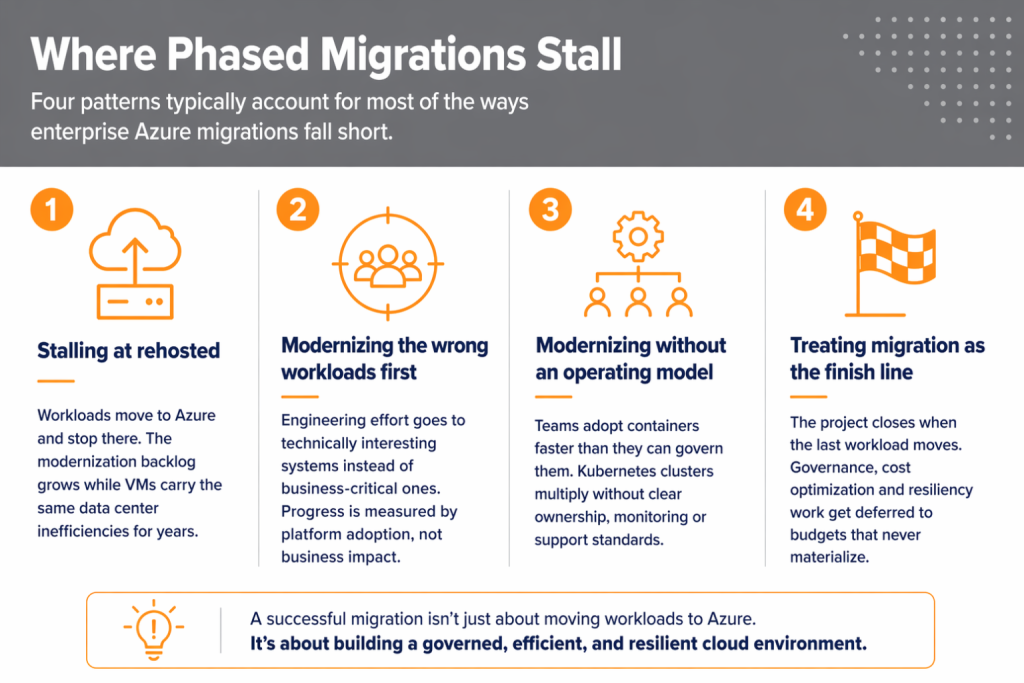
Four patterns typically account for most of the ways enterprise Azure migrations fall short:
- Stalling at rehosted. Some programs move workloads into Azure and stop there. The modernization backlog grows in meeting notes while workloads keep running on the same virtual machines, carrying the same inefficiencies from the data center. Teams begin describing the environment as “temporary” years after the migration concluded.
- Modernizing the wrong workloads first. Engineering effort concentrates on systems that are technically interesting rather than business-critical. Internal tools are refactored while customer-facing platforms continue to run on aging infrastructure. Progress gets measured by platform adoption rather than business impact.
- Modernizing without an operating model. Organizations adopt containers or cloud-native tooling faster than they can govern them. Kubernetes clusters multiply across teams without clear ownership, monitoring standards, or support responsibilities. The technology works, but the operating model underneath remains reactive.
- Treating migration as the finish line. Some programs close the migration project the moment the final workload is moved to Azure. Governance improvements, cost optimization, and resiliency work get deferred to future budgets that rarely materialize. The migration delivers workloads into Azure, not a stable, well-governed operating environment.
Why Governance Has to Come Before Modernization
Modernization does not remove operational responsibility. It changes where that responsibility shows up.
A rehosted workload keeps familiar problems contained inside virtual machines. Modernizing workloads by spreading them across services, integrations, identities, and cost centers can make them harder to detect and more expensive to address.
In one engagement, a healthcare organization discovered an unsanctioned Azure environment running outside their primary Microsoft tenant, tied to a personal credit card and completely disconnected from their existing governance framework. Critical workloads including databases and business applications, were running there with no visibility and no consistent security controls.
- Read full case study: Out of the Shadows: Turning a Rogue Azure Environment Into a Unified Security Foundation
This is where many Azure programs create avoidable debt. Teams move into managed services, containers, or serverless patterns before agreeing on who owns the platform, who responds to incidents, who controls spend, and who enforces standards after deployment. The result is a cloud environment that works but becomes difficult to operate, secure and scale consistently.
Governance has to come first because modernization increases dependency on the operating model. Once workloads become more distributed, it is harder to retrofit ownership, controls, monitoring, and accountability after the fact. The better sequence is to stabilize the foundation first, then modernize the workloads that have sufficient business value to justify the added complexity.
Conclusion
Lift-and-shift and modernization both have a place in enterprise Azure migration. Stable, short-lived or lower-value workloads may need to move quickly with minimal change. Strategic systems may deserve deeper modernization when scalability, resiliency, release speed or operational efficiency directly affect the business.
Neither approach works well without the right foundation. Governance maturity, workload ownership, platform readiness, and application team capacity determine whether the migration reduces operational risk or simply moves it to Azure.
At CrucialLogics, we approach Azure migration as an operating model decision, not just an infrastructure move. We help organizations assess their application estate, identify which workloads should be rehosted, which should be modernized and which should wait until the foundation is ready.
If your organization is preparing for an Azure migration, the goal is to move with clarity, reduce avoidable risk, and build an Azure environment that can support the business after migration. To get started, schedule an Azure migration assessment to identify the right sequence for your workloads and the governance gaps to address before they become costly operational problems.